
Kaasi V6: The Personal Finance Power Tool Upgrade
 Aanjelo Salgado

It has been over a year since Kaasi moved to the kaasi.com.lk domain, shifting from a private spreadsheet alternative into a shared public utility. Today, I am proud to announce Kaasi V6, a massive release that pushes Kaasi closer to its ultimate goal: being the ultimate personal finance power tool for serious Sri Lankans.
This update represents a complete upgrade of the system's core capabilities. Rather than acting as a simple tracker, Kaasi v6 transforms into a power tool for your money. Below is the complete list of new features, bug fixes, and improvements included in this release.
💰 Category Budgets & Organization
- Smart Category Budgets: Create customizable monthly spending limits and group multiple categories into a single budget.
- Visual Progress Tracking: A sleek new Dashboard Card tracks your monthly spending against your targets using 3-state progress bars (Green, Orange, Red).
- Flexible Sorting & Rules: Sort budgets dynamically with smooth animations. You can also hide specific categories globally from charts, PDF reports, or dashboard totals via the new "Hidden Category Rules" panel.
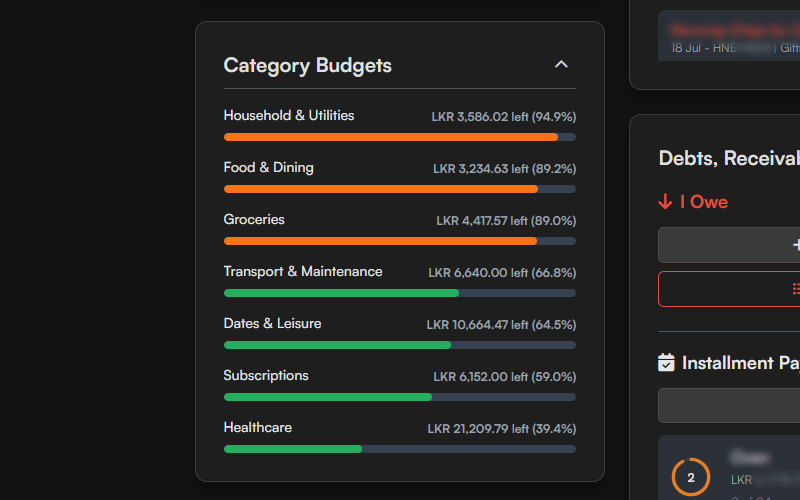
Visual category budgets help you see exactly how close you are to your limits.
💳 Credit Cards
- Credit Card History Revamp: Completely overhauled the Credit Card history view with a modern mobile-friendly layout and horizontal month tabs. The 'Unpaid' tab now shows a continuous scroll of everything owed, while the 'Paid' tab is neatly divided by billing month.
- Credit Card Progress Bars: The dashboard credit card widget now features a visual utilization bar that turns from green to yellow to red as you approach your limit.
- Bulk Payments with Categories: You can now select multiple unpaid credit card items and pay them off simultaneously while assigning each item its own specific category (e.g., Groceries, Fuel) to keep your monthly pie chart accurate.
- Partially Paid Tracking: Partially paid credit card items now explicitly show "X of Y Paid" (or "X Left" on mobile) to clearly track your progress.
💸 Moving Money Between Accounts
- Integrated Account Transfers: Moving money between accounts is easier than ever. The Transfer function is now built directly into the main "Add Transaction" view, complete with dynamic account defaults and automatic transfer fee tracking.
📱 App Installation & Offline Experience
Kaasi can now be installed directly to your phone or computer just like a native app (known as a Progressive Web App), giving you a full-screen experience that works completely offline.
Tip: Kaasi works best on Android when installed through Google Chrome. Simply tap the "Install App" button at the bottom of the Kaasi web app!
- True Offline Support: All fonts and core files are now stored locally, ensuring the app loads instantly and works flawlessly without an internet connection.
- Native Back Gestures: Swiping back on your phone now safely closes popups and menus instead of accidentally closing the entire app.
🔒 Security & Privacy
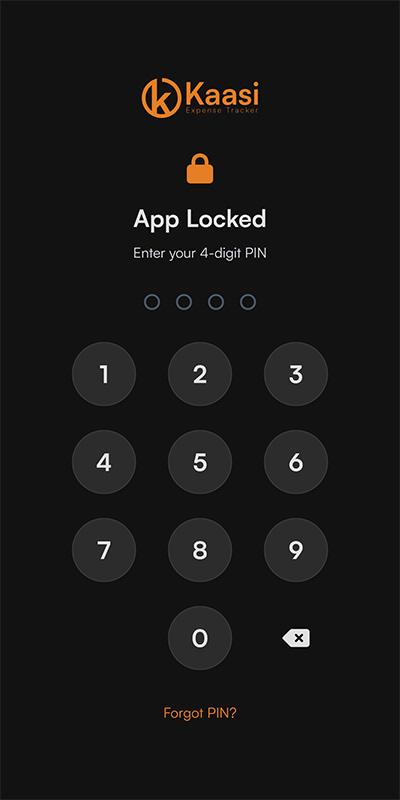
- App PIN Lock: Secure your financial data with a new 4-digit PIN lock screen that features auto-lock on inactivity. The app's interface is completely hidden until unlocked, preventing anyone from snooping.
- Secure PIN Recovery: Forgot your PIN? You can now use a secure recovery code mechanism (contact me to get yours) to safely regain access without losing data.
- Privacy-First Analytics: We now track basic app usage to see which features are popular, without ever collecting any of your personal or financial data.
- Console Privacy: We removed the full state data dump from the developer console on load, ensuring your entire financial state isn't visible to shoulder-surfers if the dev tools are opened.
☁️ Cloud Sync & Backups
- Seamless Cloud Onboarding: Setting up a new device? You can now instantly log in and restore your cloud backup right from the welcome screen, skipping the manual setup wizard.
- Smart Sync Warnings: The app now detects out-of-sync states instantly, warning you if your cloud data is newer or if you have unsaved local changes to prevent accidental overwrites.
- Session Expiration Detection: Added a smart alert that detects if your cloud session expires in the background, prompting you to log back in before you lose any backups.
- Last Sync Timestamps: Instantly see exactly when your last cloud backup was completed with human-readable timestamps (e.g., 'Today at 12:23 PM').
- Overwrite Protection: Added a safety warning if you attempt to overwrite newer cloud data. Power users can quickly bypass this in the future with a new "Don't show again" checkbox.
- Dynamic Backup Reminders: Local backup reminders are now interval-based (3 days, 7 days, 30 days) and smartly adjust based on whether you are using Cloud Mode.
🔍 Advanced Search & Filtering
- Multi-Select Category Filter: Added a robust new filter allowing you to select multiple categories at once to easily isolate specific spending habits.
- Quick Date Ranges: Added a new "Date Range" dropdown (e.g., This Year, Past 6 Months, or set custom dates) for effortless time-based filtering in your transaction history.
- Smart PDF Exports: The 'Export PDF' button automatically hides while searching or filtering to prevent generating incomplete reports.
🧮 Inline Math Calculator
- Built-in Calculations: A sleek math toolbar is now integrated directly into all amount input fields. You can type full equations like
1500+350*2and the app will evaluate them for you on the fly. - Mobile & Desktop Support: Includes a dedicated calculator button and touch-friendly interface, ensuring snappy calculations across all devices.
- Disabled Annoying Autofill: Disabled browser-native autocomplete on all amount fields so annoying dropdown menus stop blocking your calculator view.
- Comma Support: You can now seamlessly type commas in amount fields (e.g.,
10,000) and the app will handle it automatically.
🎨 Design & UI/UX Polish
- Light Mode & Custom Themes: Added a stunning new high-contrast Light Mode alongside the classic Dark theme.
- Dashboard Customization: Declutter your view by hiding sections you don't use (like the Cash Counter, Debts, or Installments) directly from the Appearance settings. You can also toggle the visibility of the default 'Cash' account.
- Mobile Experience Overhaul: Replaced the cluttered top navigation icons with a sleek, native top-right mobile hamburger menu. Upgraded touch targets, added Android haptic feedback, and reordered the dashboard on mobile so the 'Balance Overview' card sits above Credit Cards for a more logical flow.
- Renamed View: Renamed the old 'Monthly View' to 'All Transactions' and updated the keyboard shortcut to 'A' for clarity. It now smartly defaults to the current month when opened.
- Smooth Animations: Added micro-animations across the app, including count-up effects on dashboard load, sliding tab indicators, and smooth stagger entrances for lists.
- Transaction Details Modal: Tapping a transaction now opens a clean, focused Details view instead of triggering inline edits, eliminating text truncation on small screens and providing a cleaner hierarchy.
- Mobile Spacing: Perfectly tuned the padding and sizes for transaction items, debts, and installments to look great on small screens.
- Preloader Tips: The startup screen now displays helpful budgeting tips and keyboard shortcuts, helping you discover features you might not be aware of while the app loads.
- Debt Progress Bars: Partial payments on Debts and Receivables now show a visual progress bar indicating how much is left to repay.
- Unified Icons: Standardized the action icons across the app (like using a consistent grey pencil for 'Edit' and a soft X for 'Delete').
- Cash Counter Enhancements: The Cash Counter now supports scroll-wheel inputs to quickly increase or decrease bills, blocks decimal entries, and calculates totals more reliably.
- Form Streamlining: Rearranged the Debts and Receivables forms to place the "Amount" field first, matching the flow of regular transactions.
- Responsive Settings Tabs: Added horizontal scrolling to the Settings menu tabs to prevent text from wrapping awkwardly on small screens.
- Settings Cleanup: Consolidated the standalone Credit Card settings directly into the Accounts tab for easier management.
- Settings Polish: Input fields across the Settings menu are now perfectly spaced, and interactive elements like segmented controls and keyboard shortcut badges visually blend with the app's brand colors.
- Background Scroll Locking: Fixed an annoying issue where the background would scroll while interacting with menus or popups on mobile.
- Visual Polish: Perfectly centered the percentage text inside circular progress rings for a cleaner look.
- Modernized Charts: Upgraded the generic monthly pie chart into a sleek doughnut chart with a curated color palette, soft rounded slices, and negative space borders. Replaced the traditional tooltip with a dynamic center-text overlay (featuring smart device-aware placeholders and click-to-lock functionality) when interacting with a slice, and intelligently bundles tiny expenses under 2% into an "Other" category to prevent visual clutter. Additionally, the dashboard daily expenses chart was upgraded from a line graph to a dynamic bar chart for clearer day-to-day visualization.
- Beautiful Empty States: Replaced generic plain-text empty states across the app (like "No transactions yet") with beautiful, refined layouts featuring muted FontAwesome icons and centered typography.
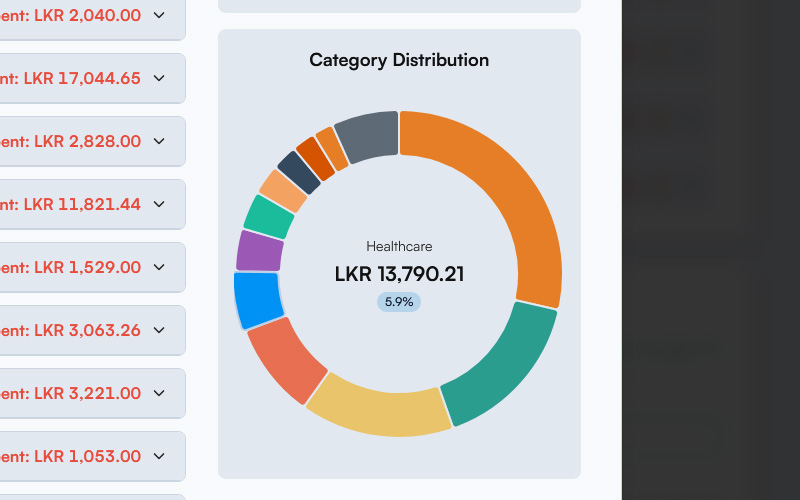
The upgraded charts and Light Mode option make reviewing your month beautiful.
⚙️ Under the Hood
- Codebase Modularization: Completely refactored the codebase into focused modules for significantly improved maintainability and performance.
- Smooth Chart Morphing: Chart.js elements no longer visually "flash" out of existence when data updates; they now natively morph and animate between states.
- Accessibility Enhancements: Upgraded color contrast ratios to a new highly readable palette, and improved keyboard navigation across the app so it's easier to use for everyone.
- Data Wipe Reset: Choosing to 'Delete All Data' now safely logs you out and returns you immediately to the Setup Wizard for a clean slate.
- Security Hardening: Significantly improved overall app security and patched potential vulnerabilities to keep your data safe.
- Logic & Safety: Added protective checks preventing users from hiding all accounts (which would break transaction forms) and fixed bugs related to saving background preference states (like the quick action target).
- Timezone Accuracy: Fixed a legacy issue where date inputs defaulted to UTC time, ensuring all new entries now accurately lock to your local timezone.
- Updated Help Info: The Settings info pane has been updated to accurately explain the new backup interval systems and cloud features.
Kaasi V6 is rolling out today. Launch the app, save it to your home screen, and master your financial flow.
As always, Kaasi is completely free and private. Voluntary donations to support the development process and AI subscriptions are always welcome, and details can be found on our home page.